
Working Log
Week 08
Current Stage · Gesture-Controlled Sticker Booth Prototype
1. Development Progress
Following my Week 06 to-do list, I continued testing gesture-based drawing and explored how finger movements could generate different visual effects. I also started improving the interface and experimenting with ways to combine stickers with the webcam image. However, the original PNG export function still needs further testing, and integration with the final Collage Studio has not yet been completed.
Using Codex, I developed a separate experiment with ml5.js HandPose and p5.js, while keeping my original MediaPipe prototype unchanged. I first experimented with particle drawing, where finger movement speed controlled particle size and spread.
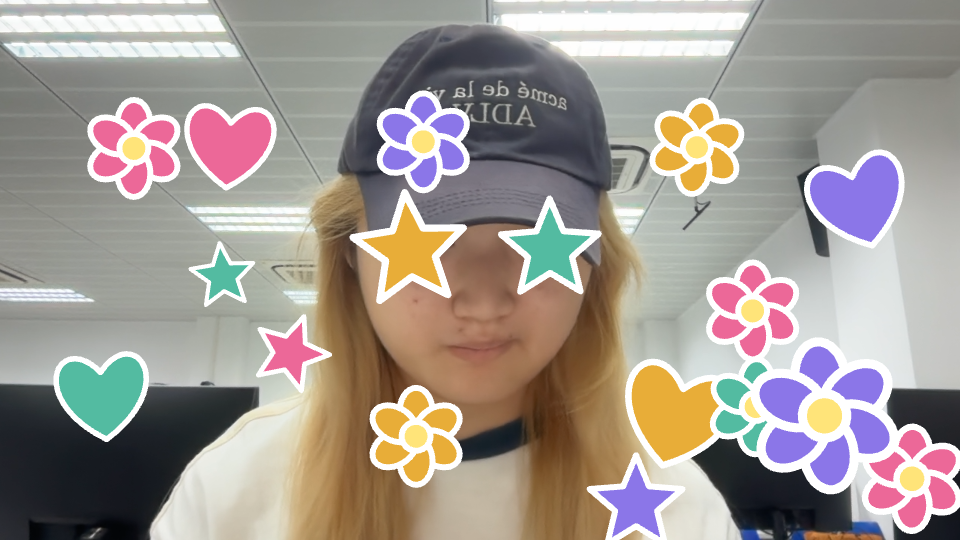
After testing this direction, I decided to focus on manipulating individual stickers rather than drawing continuous paths. The experiment gradually developed into a gesture-controlled sticker booth where users can create, move, resize, and rotate stickers directly over their webcam image, then take a photograph.
2. What I Did
I first explored generative drawing with colorful particles. Finger movement speed controlled their size and spread: slow movements produced smaller, denser particles, while fast movements produced larger, more scattered particles.
After testing this direction, I realized that manipulating individual stickers was closer to my project concept than drawing continuous paths. I therefore asked Codex to develop pinch-based sticker interactions.
The current version allows users to generate stickers with a pinch, drag them with one hand, and use two-handed pinching to resize and rotate the selected sticker. I removed the earlier requirement to switch interaction modes with the mouse.
During testing, I encountered several interaction problems. For example, stickers sometimes continued following my hand after I released them, and the two-handed scaling and rotation did not always work as expected.
I described these problems to Codex and asked it to revise the gesture interaction logic. I then tested the updated prototype and provided further feedback. This process helped me refine the interaction rules, although gesture recognition and manipulation still need improvement.
I also combined the sticker layer with the live webcam view and added a three-second photo countdown. The resulting photograph includes the person, background, and stickers. Users can save the photograph or retake it.
Finally, I refined the interface with a gesture-controlled sticker tray, creation animations, pinch indicators, and selection feedback.
3. To-do List
- Test gesture recognition under different lighting conditions.
- Check whether new users can understand the controls without explanation.
- Refine sticker selection, release, and two-handed manipulation.
- Develop more original sticker designs that match the project’s visual direction.
- Explore how this prototype can connect with the Memory Machine and Collage Studio.
4. Existing Problems
Gesture interaction still needs refinement. Hand movements can be ambiguous, and tracking interruptions may affect selection or manipulation.
The current sticker library is limited to flowers, stars, and hearts. Although users can personalize their arrangement, the sticker designs themselves are still relatively simple.
The prototype also remains separate from the complete Made by You website.
5. Possible Solutions
I will continue testing clear gesture thresholds and visual feedback to help users understand when a sticker is selected, held, or released.
I plan to develop a small, consistent collection of original stickers before expanding the library. I also want to explore how gesture parameters could influence their appearance, rather than only their position and size.
Once the interaction is sufficiently stable, I will investigate how to reuse the generated materials in the final collage system.
6. Reflection
This week’s development helped me distinguish between recognizing a hand and designing a usable gesture interaction. Tracking coordinates alone does not explain how users should select, move, or release an object.
My main contribution was defining the experience, testing the prototype, identifying problems, and directing the revisions. Codex assisted with implementation, ml5.js provided hand-tracking data, and p5.js rendered the stickers and visual feedback.
The project now has a clearer interaction direction: users can play with stickers in their own surroundings and preserve the result as a personal photograph. My next priority is to improve reliability and develop a stronger visual identity.
Week 06
Project · Made by You: A Playful Factory for Generative Collages
Current Stage · Gesture Recognition Prototype
1. Development Progress
After my Idea Presentation, my instructor suggested that I investigate how to implement gesture recognition.
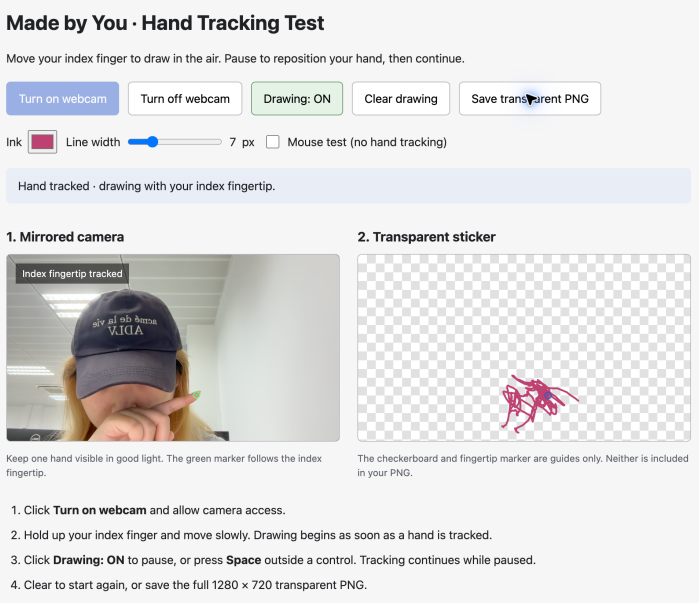
On October 16, I used Codex to develop an initial Gesture Machine prototype and successfully tested webcam-based fingertip tracking on my Mac.
2. What I Did
I explored online examples of gesture-controlled websites, most of which were developed with Gemini. Since I plan to use Codex for my entire project, I wanted to test whether it could achieve similar interactions.
I asked Codex to create a prototype that tracks the user's index finger and allows them to draw in the air. Codex used Google MediaPipe Hand Landmarker for finger tracking and HTML Canvas for drawing. The prototype includes drawing, pause/resume, clearing, and transparent PNG export.
I tested the webcam and confirmed that the system could recognize my index finger. According to Codex, the drawing and export functions also passed its browser tests.
3. To-do List
- Test the drawing and PNG export functions more thoroughly.
- Explore how finger movements can generate different stickers and patterns.
- Improve the visual style of the Gesture Machine.
- Integrate generated stickers into the Collage Studio.
4. Existing Problems
Although fingertip tracking works, I have not yet explored how to transform movement data into unique generative stickers.
I also need to consider how to integrate the Gesture Machine into the final website.
5. Possible Solutions
I plan to use Codex to experiment with parameter-based visual generation, where finger speed and movement trajectories influence sticker shapes and patterns.
I will first test simple effects before developing more complex interactions and integrating them into the collage system.
6. Reflection
This experiment confirmed that webcam-based fingertip tracking is feasible for my project.
It also helped me understand how Codex can assist with implementing interactive features using existing technologies.
My next goal is to move beyond basic finger tracking and develop more creative, personalized visual outputs.